A WooCommerce plugin
One click.Order sent.
Webhook Buttons for WooCommerce
Put a button on the WooCommerce order screen. Click it, and that order goes as JSON to the tool you choose — Zapier, Make, n8n, Pabbly Connect, Power Automate, or any webhook URL. No code. Staff start the workflow at the right moment.
Free version has no limits · GPL-2.0-or-later
How it works
Three steps. Then it just runs.
- 01
Add a box and a button
In Webhook Buttons, give the box a title, the button a label, and paste the webhook URL from your automation tool. Choose whether the button asks before it sends.
- 02
Open an order and click
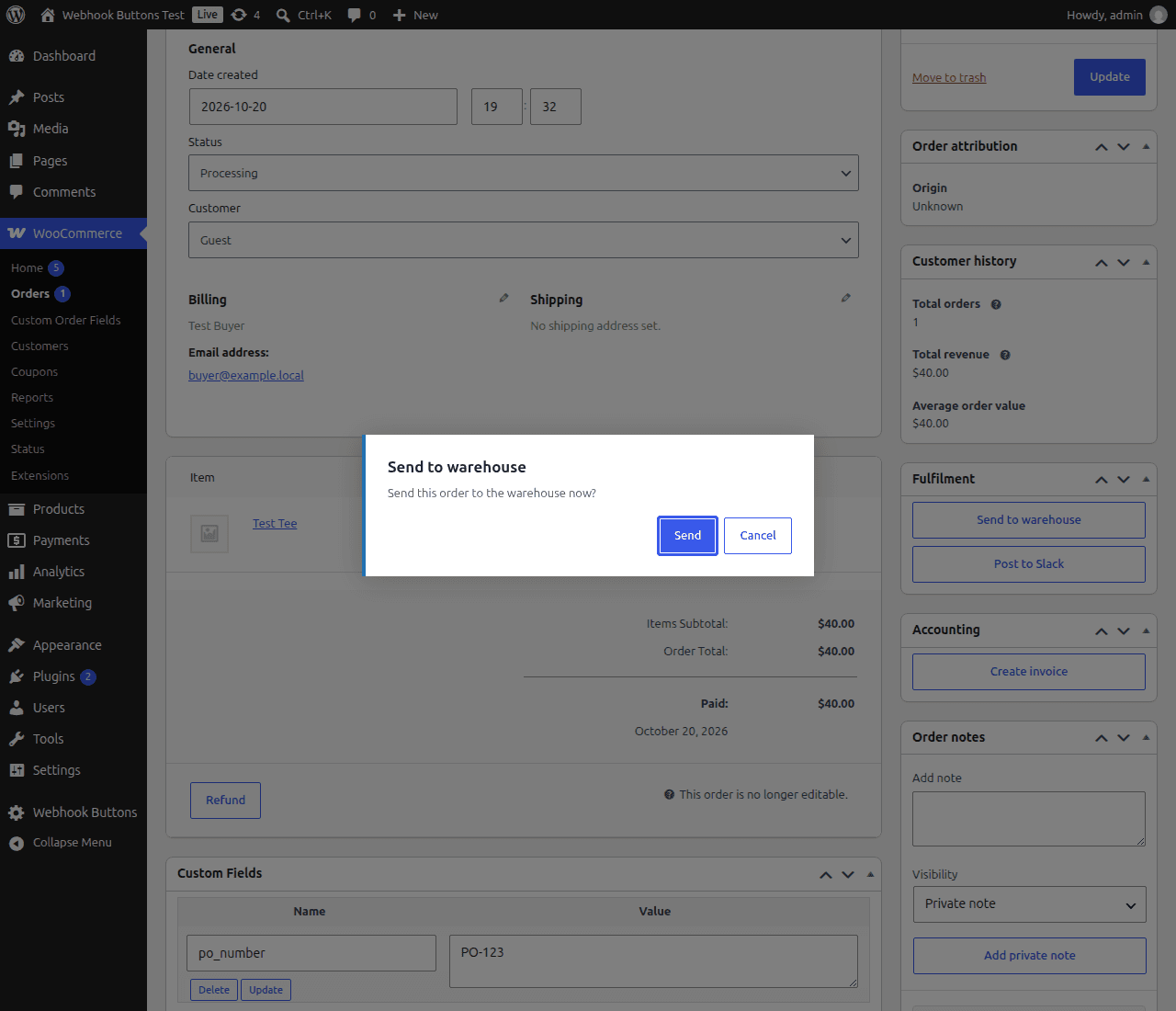
The box sits in the right-hand column of every order. Staff click the button when the order is ready. A note is added to the order with the result.
- 03
Your tool receives the JSON
The order ID, status, totals, billing, shipping, line items, and who clicked arrive as one clean JSON POST. Map the fields once and the workflow runs itself.
Free vs Pro
The free version does the job. Pro does more of it.
Free
$0 · no license · no limits
- Add as many buttons as you need, in one or more boxes on the order screen.
- Give each button its own webhook URL.
- Ask for confirmation before a send, or send right away.
- Send an order again whenever you need to.
- Leave chosen product attributes out of the data.
- Every send adds an order note with the result.
Pro adds
from $49/year
- Custom fields: values from the WooCommerce Admin Custom Order Fields extension, plus any order meta keys you pick (Checkout Field Editor, ACF and others).
- Flat data: one level, for tools that cannot read nested fields.
- A short staff note sent with the order.
- User access control: show a box or a button only to the staff you pick.
- Sample sends with up to 100 line items, so Zapier, Make and n8n see every field.
- An auth header on each button's requests, for example an API key.
Pricing
Pro, billed once a year.
Pick how many sites you run. Every plan includes a year of updates and support.
- 14-day refund, no questions.
- 10% off every renewal.
- Updates and support for the year.
- When a license expires, the free features keep working.
No limits in the free version. Unlimited boxes, buttons and resends, forever, with no license.
What is sent
One JSON POST per click.
The order ID, status, date, total, billing and shipping details, customer email and phone, the customer note, the line items, and the name of the user who clicked. Dates use ISO 8601.
You choose where order data goes. You are responsible for the customer data you send.
{
  "order": {
    "id": 1042,
    "number": "1042",
    "status": "processing",
    "created_at": "2026-10-20T19:32:59+00:00",
    "currency": "USD",
    "customer_note": "Leave at the side door."
  },
  "totals": {
    "total": "40.00",
    "subtotal": "40.00",
    "tax": "0.00",
    "shipping": "0.00",
    "discount": "0.00"
  },
  "billing": {
    "first_name": "Test",
    "last_name": "Buyer",
    "email": "buyer@example.com",
    "phone": "+1 555 010 0199"
  },
  "shipping": { "first_name": "Test", "last_name": "Buyer", "city": "Norman" },
  "items": [
    { "name": "Test Tee", "quantity": 1, "attributes": { "size": "M" } }
  ],
  "button": { "label": "Send to warehouse" },
  "sent_by": "admin",
  "sent_at": "2026-10-26T08:44:35+00:00"
}
Questions
Plain answers.
- Which services can receive the data?
Any service that gives you a webhook URL that accepts a JSON POST. Examples: Zapier, Make, n8n, Pabbly Connect, Microsoft Power Automate, IFTTT, Activepieces, Pipedream and Zoho Flow. Make and n8n offer webhooks on their free plans; Zapier and IFTTT need a paid plan for webhooks.
- Does it work with High-Performance Order Storage (HPOS)?
Yes. The plugin declares HPOS compatibility and supports both the HPOS and the classic order screens.
- Can I send to a tool on the same server (localhost)?
- By default WordPress refuses requests to localhost and private network addresses, which protects shared hosts. To allow your own n8n or similar on the same machine, add one line to your theme or a small plugin:
add_filter( 'http_request_host_is_external', fn( $external, $host ) => $host === 'localhost' ? true : $external, 10, 2 ); - Why does the settings page warn about http:// URLs?
Order data includes customer names, emails and phone numbers. Over plain http:// it travels unencrypted. Use https:// wherever you can.
- What is the difference between the free version and Pro?
The free version sends the standard order data (order, totals, billing, shipping, line items) from as many buttons and boxes as you like, as often as you like. Pro is extra code, not a switch: custom fields, flat data, staff notes, user access control, sample sends with up to 100 line items, and an auth header per button.
- What happens when my license expires?
All buttons keep working with the free features. The Pro options switch off until you renew, and the values you set for them are kept, so they come back when you renew. Updates and support stop until then.
- Who can click the buttons?
Users who can edit WooCommerce orders. Pro can limit each box and each button to chosen users.
- Does the plugin send data to anyone else?
No. There is no telemetry. License checks use Freemius; if you opt in, Freemius receives your site URL and email. Nothing else leaves your site except what you send to your own webhook URLs.
- Where do I get help?
Free users: the WordPress.org support forum. Pro license holders: in your WordPress admin, go to Webhook Buttons > Contact Us. That form comes straight to us with your license attached.
Support
Stuck? Ask.
Free
WordPress.org support forum
For the free version. Public, searchable, answered by us.
Pro
Webhook Buttons > Contact Us
For Pro license holders. In your WordPress admin, open the Webhook Buttons menu and click Contact Us. The form reaches us with your license attached, and we answer by email.